A spline goes in. The whole guardrail comes out assembled.
Apply the modifier to the path spline and the plugin distributes the modules, raises the start, end and corner posts, sweeps the rails and closes the handrail. Non-destructive: change the spline or one parameter and everything rebuilds on the modifier stack.
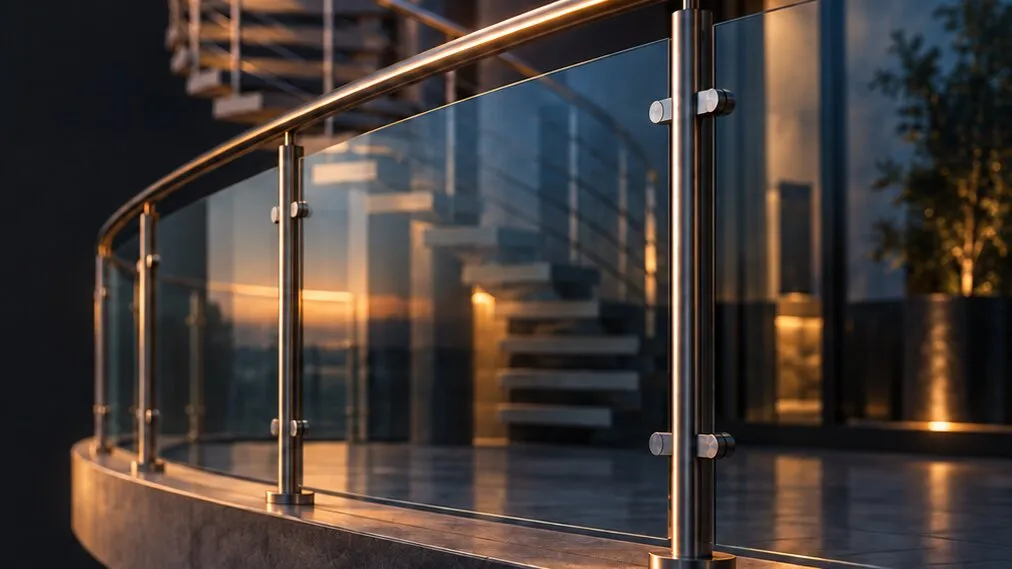
The stair moved one landing. The guardrail was dead geometry.
A hand-modeled guardrail is a stack of copies. Every baluster was placed by you, and none of them knows the path changed. Worse: on a curve, spacing by eye gives an irregular run, because the distance that matters is measured along the arc, not in a straight line. AnimArq Railing stores the intent — path, step and parts — and the run is the consequence. Changing your mind costs one spinner.
The spline leads. The parts follow.
The path is sampled by arc length, so spacing stays uniform even on a curve. The plugin splits the run at its corners, builds each stretch on its own and puts a post oriented by the bisector at the vertex — the corner piece never crosses the bend. On a ramp, a stair or a spiral you pick: module always plumb or following the slope.
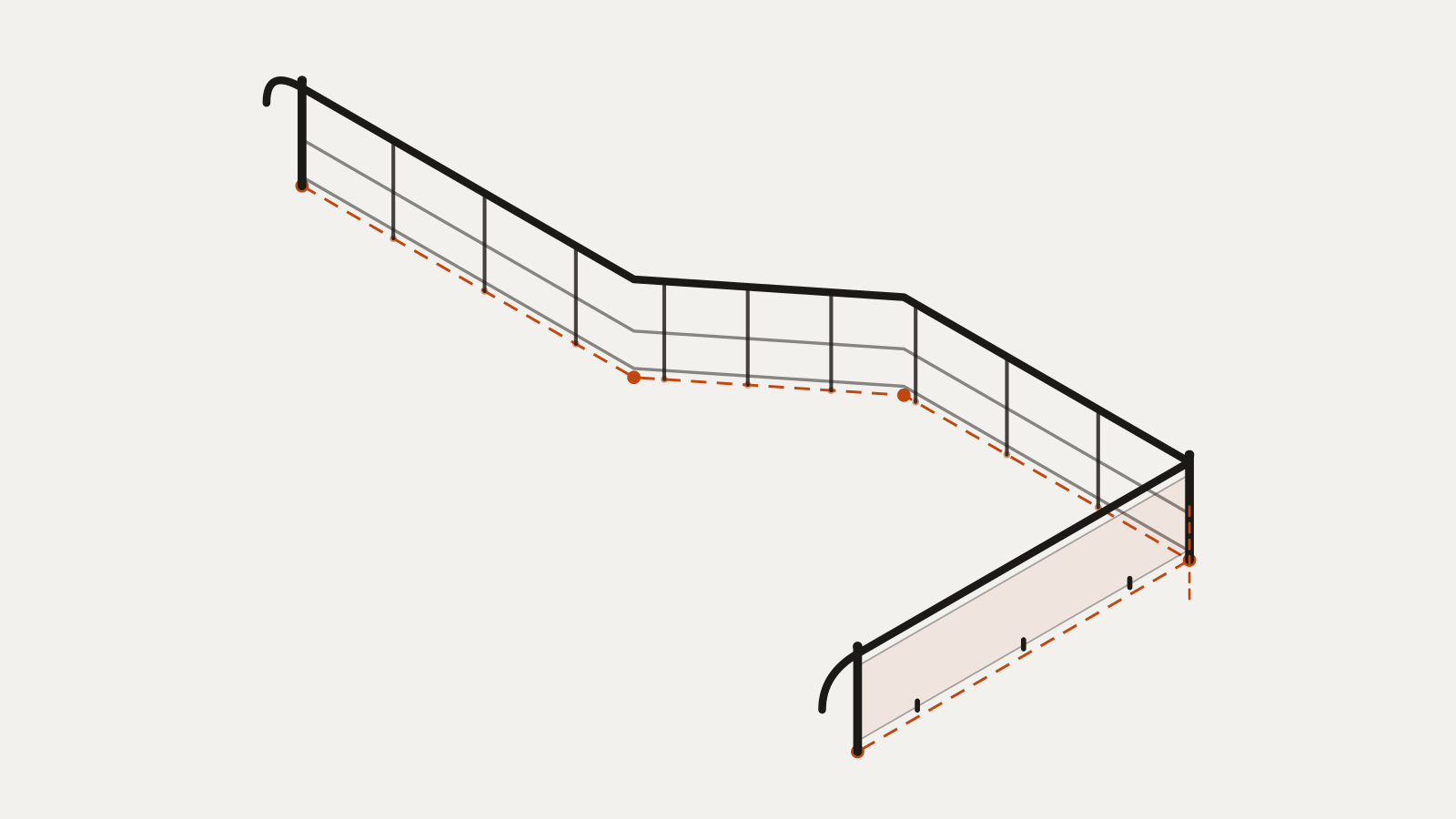
The dashed line is the source spline; the larger dots are its vertices and the smaller ones the stations measured by arc length.
Seven modes, because closing a span isn’t always the same arithmetic.
By spacing, by count, by module size, stretching the module so the span closes exactly, adaptive — which rounds the count and compresses or stretches the modules by up to half a module —, by exact step with the slack split evenly at both ends, or by clipping: the pattern is over-generated and trimmed at the end of the stretch, and the leftover fragment is discarded when it falls below the fraction you set.
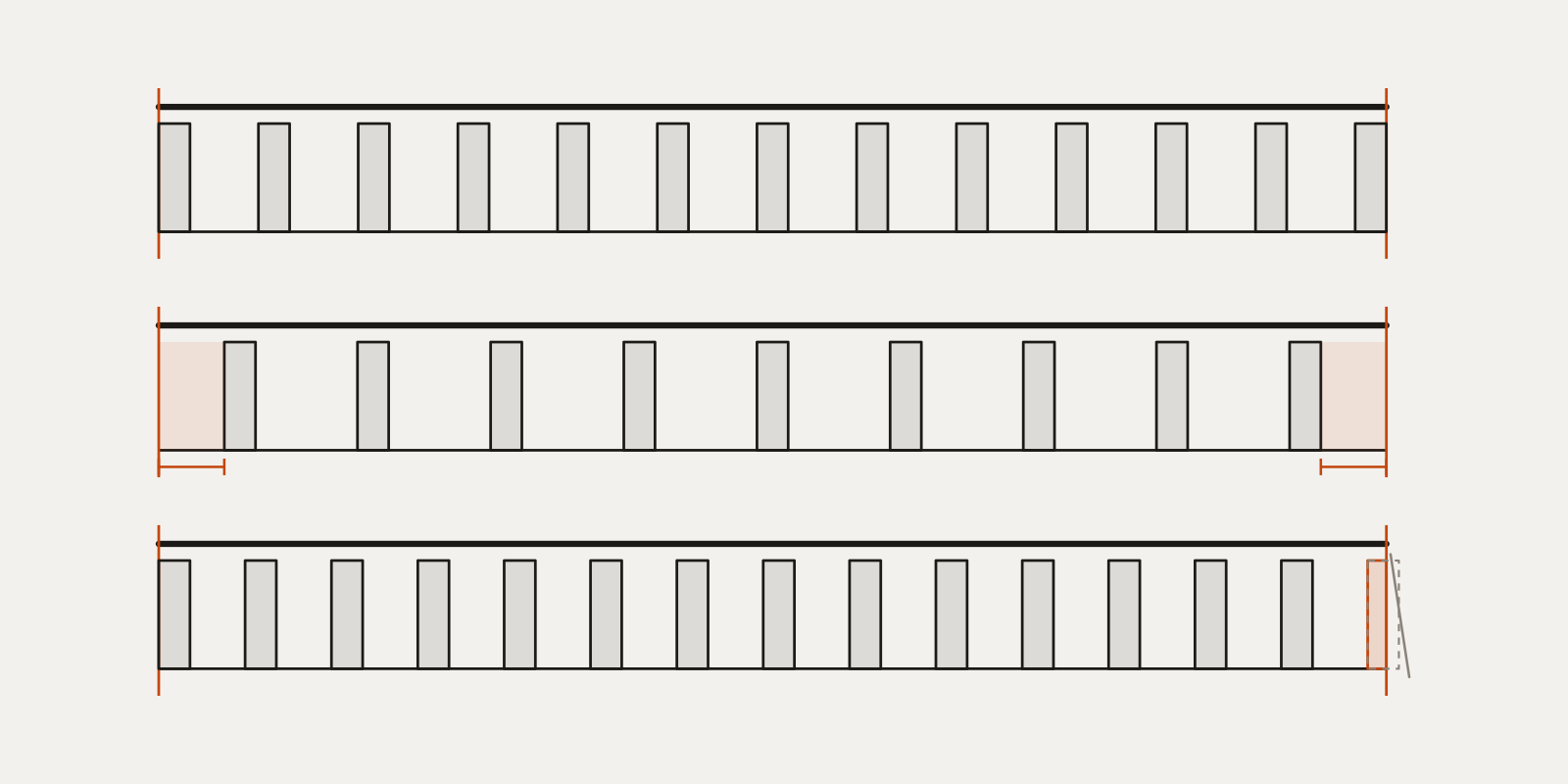
Top to bottom: by spacing, centered exact step (slack in orange) and clipping, with the trimmed piece in orange and the remainder discarded.
Code heights land in the generation, not in the review.
A combo picks the code. Under NBR 14718 the guardrail is generated at 110 cm. Under NBR 9050 the handrail becomes double, at 92 and 70 cm, with end returns: the extremity closes in a half turn joining both heights, instead of ending in two loose hooks in the air. Measurements are physical, in centimeters, converted by the scene unit.
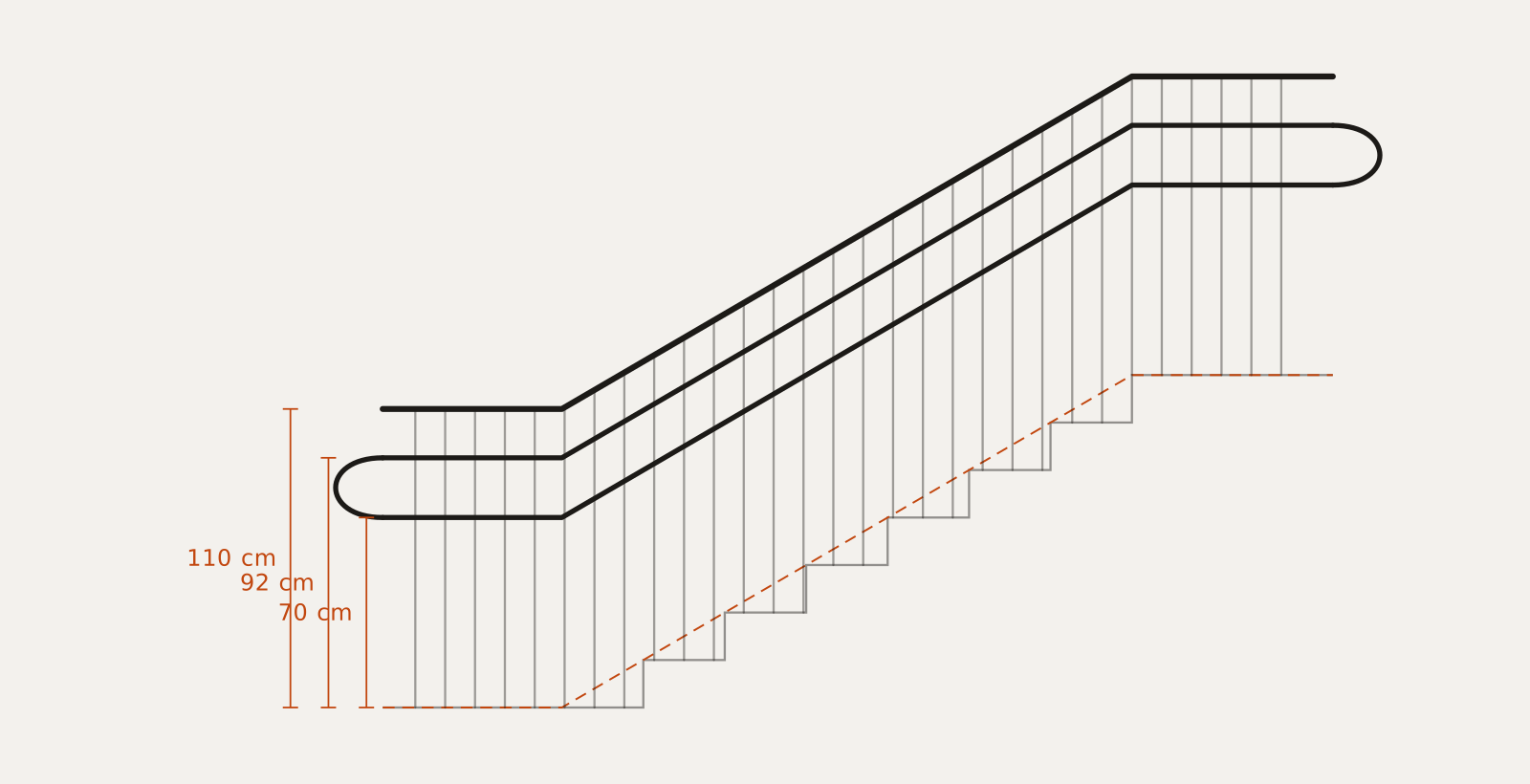
Heights are measured from the tread nosing line, dashed in orange.
Four moves.
Draw the path
A spline, open or closed, following the stair, the balcony or the property line.
Apply the modifier
The guardrail shows up immediately, on the chosen preset, with post, rail and handrail.
Point at your own parts
Module, start post, end post, corner post, middle piece and secondary piece are objects from your scene.
Tune the step
Distribution mode, spacing, height, code and random variation, all re-editable.
A complete guardrail, assembled from parameters.
Your parts, not mine
Six scene objects can be picked: module, start post, end post, corner post, middle piece and secondary piece. The plugin normalizes the model on its own — it centers the bounding box laterally and along the path, preserves the height as you modeled it, and rotates 90° when the part was modeled crosswise. A misplaced pivot doesn’t spoil the distribution.
31 styles, five decisions
Each of the 31 ready-made styles is a recipe of five independent choices: post, top finish, infill, base and clamp. Changing one doesn’t unmake the others. The Custom preset starts empty: only what you picked comes in, and a picked part always takes priority over a generated one.
Seven distribution modes
Target spacing, fixed count, module size, module stretched so the span closes exactly, adaptive, exact step with a centered pattern, and clipping with fragment discard. All sampled by arc length and deterministic: same path and same parameters, same result.
Corners treated as corners
An angle threshold separates curve from corner: the curve keeps being distributed, the corner becomes a joint. At the vertex the post is oriented by the bisector and the module is mitered against the bisector plane, so the two ends meet without interpenetration. It also holds on a closed path, corner by corner.
Universal handrail
The handrail works with any preset and also on its own, with no guardrail: round metal tube, round wood, flat wood or flat dark. With a 90° end return plus a vertical drop, a half turn joining both heights in double mode, and a wall bracket with stem, arm and flange.
Rails swept with mitered joints
Rails and handrail are swept along the path by parallel transport, with no accumulated twist. At corners the profile is cut on the bisector plane and stretched by 1/cos of the half angle, so the section doesn’t thin out at the bend. Round profile with smooth sides, rectangular with a hard edge.
Panel that follows the step
In the mode where the module fills the span, the panel deforms along the stretch’s real arc length — on a curve it curves, instead of faceting into straight chords. On a stair span the panel comes out as a parallelogram with plumb edges, following the step riser. Clamps belong to the panel, not the post, so they stay correct at a corner.
Seeded variation
Seeded random rotation, scale and lateral offset, applied to modules only — posts stay exact. Plus module mirroring, global lateral and vertical offset, and a secondary piece distributed inside each stretch. The same seed always returns the same run.
Seven material slots
The mesh comes out with fixed material IDs, so your scene’s Multi/Sub-Object drops straight in: structure, infill, handrail, glass, bases, wood and dark hardware. UV channel, smoothing groups and edge visibility come with it.
Part list on every evaluation
On every re-evaluation of the modifier the panel returns the count of posts, modules and panels, the glass area and the rail lengths, in scene units. A take-off with nothing exported.
It won’t freeze 3ds Max
Every loop driven by a user parameter has a cell cap and a minimum step. Near-zero spacing on a long path is the classic recipe for locking Max up for minutes; here the value is clamped before any geometry is generated. In a heavy scene, hardware detail drops on its own with the part count — or you pin it to Full, Reduced or Light.
Safe picks in the scene
Every object pick validates what you point at: the modifier’s own object and any object that would close a reference loop are refused — exactly what would otherwise hang the scene evaluation. Right-click the field to clear the pick.
Numbers and limits
What ships in the plugin today, and what the free trial unlocks before you buy.
2021–20273ds Max versions, on 64-bit Windows.dlonative modifier, no dependency to install7distribution modes along the path31ready-made guardrail, fence and handrail styles6parts from your scene that can be picked7fixed material IDs, for Multi/Sub-Object2codes applied on generation: NBR 14718 and NBR 90503machines per licence, tolerant to a hardware swap5 mof path in the free trial, no expiry, with the Iron Handrail and Steel Tube stylesStep by step with this tool.
Railings in 3ds Max, from spline to code height
Three ways to build a railing in 3ds Max — the native Railing object, the Spacing Tool and a parametric modifier — plus the guard and handrail heights to check before you render.
Before you buy
No. It is a one-time payment: the licence is lifetime and keeps working with no renewal.
3ds Max 2021–2027, on 64-bit Windows.
Close 3ds Max and copy the file pair into your version's Plugins folder: AnimArqRailing.dlo and the en-US subfolder, with AnimArqRailing.dlo.mui inside. The two go together. When Max opens, the modifier shows up in the list, under the AnimArq category. If it doesn't load on an older Max, install the latest Microsoft Visual C++ 2015–2022 Redistributable (x64).
No. There are 31 ready-made styles across guardrail, fence and handrail, each assembled from five independent choices — post, top finish, infill, base and clamp. If you already have your own parts, pick the scene objects: module, start post, end post, corner post, middle piece and secondary piece. A picked part takes priority over a generated one.
Yes, and on spirals too. The path is sampled by arc length, so spacing stays uniform on a curve. On a ramp or a stair you choose between a module always plumb or one following the slope. At corners the post is oriented by the angle bisector.
Yes, on generation: NBR 14718 gives a 110 cm guardrail and NBR 9050 a double handrail at 92 and 70 cm, with end returns. Measurements are physical, in centimeters, converted by the scene unit — and stay re-editable, since none of it is collapsed to mesh.
It builds the Iron Handrail and Steel Tube styles over the first 5 m of the path, with no expiry — enough to test spacing, corners, stairs and performance in a real scene. The licence unlocks the other styles, your own scene parts and the whole path. Network render nodes build the full railing, without the trial cut.
Design changed? Edit the spline.
Lifetime licence, one-time payment, 3 machines. Unlicensed, the plugin builds the Iron Handrail and Steel Tube styles over the first 5 m of the path, with no expiry — test spacing, corners and stairs in your own scene before you buy.